

I waste half my workday relearning the things I repeatedly forget.
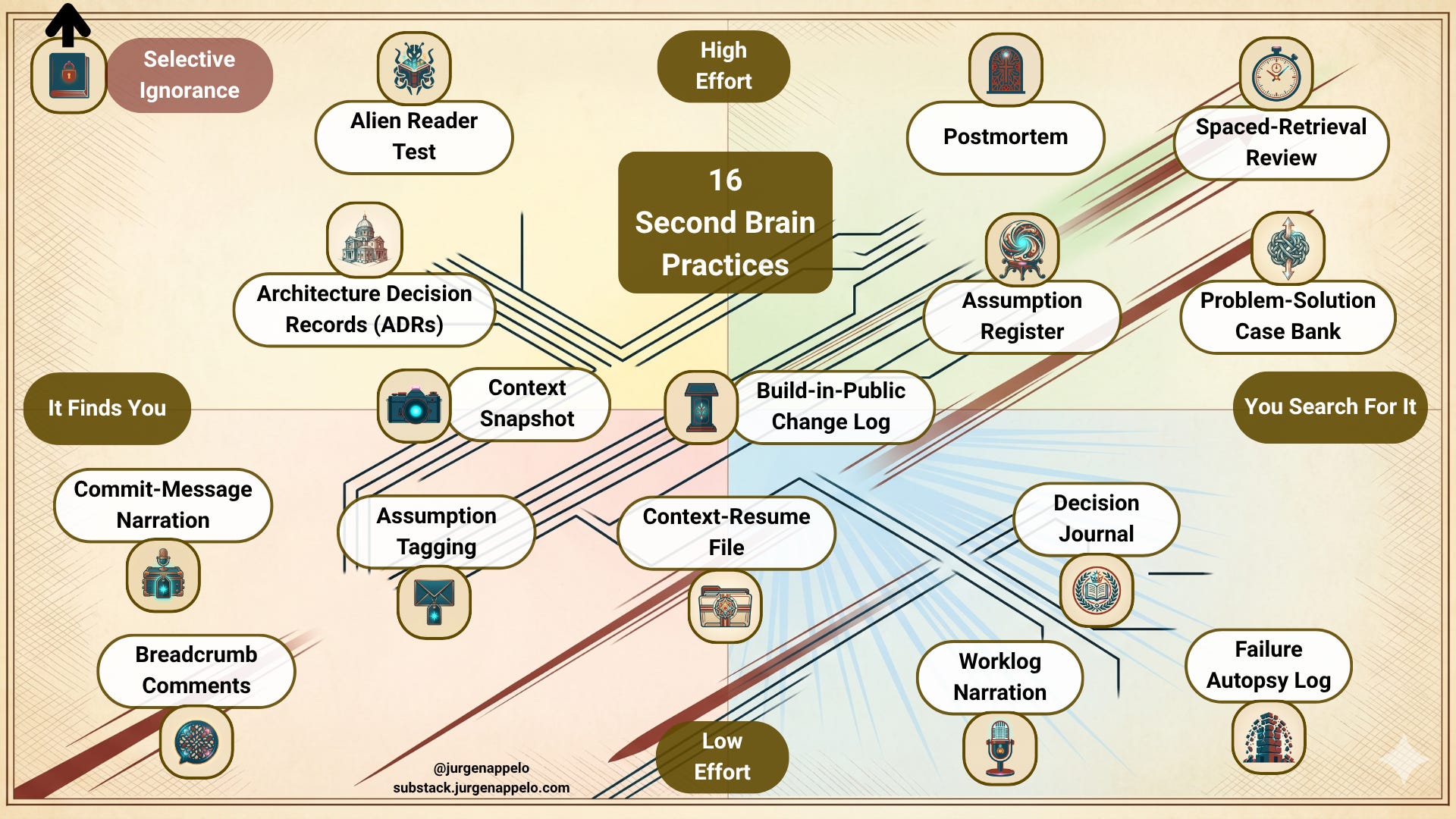
A map of 16 second brain practices to help solo operators remember decisions, recover context, and stop breaking their own systems.
Just this morning, I spent several minutes looking for the official documents of the notary. And when I found them, I thought, “Why are they here, for God’s sake?” That was at least the fifth time I’ve been looking for those same documents. Most likely, I’ll be searching for them again next year.
Last week I opened a Make scenario I’d built in February. It had a strange routing choice—three filters where two seemed enough. I stared at it for ten minutes, trying to work out why Past Me had done something so odd. Then I spent another twenty minutes deciding Past Me was an idiot and simplifying it.
Then everything broke.
Turned out Past Me had a good reason. Present Me just couldn’t remember it, couldn’t ask anyone, and had already committed the change.
If you run a one-person business, there’s no colleague who remembers why the pricing page looks like that. There’s no team Slack where someone says, “Don’t bother. We already tried that in Q2 and it broke.” There’s no helpful institutional memory floating around in other people’s skulls.
There’s just your fallible brain.
And your overloaded mind is already busy switching between six projects, four invoices, a tax deadline, and one client who writes emails like they’re auditioning for a remake of Succession.
So I went looking for a better map. Where do I store and find yesterday’s decisions? What are my second brain options?
👉🏻 Note: It seems every self-respecting Substack author has published a “How I built my second brain” article, full of details on Claude Code, Perplexity, Notion, Obsidian, or whatever technical-tool-du-jour is making waves these days. That’s not what I’m interested in. What I want to know is: what are the recommended second brain techniques? Not how to build one, but how to use one. 👈🏻
I asked four different AIs to chart the full territory, compared their answers, merged them, and pressure-tested the result. What came back was sixteen distinct practices. Not a ranked list. Not a “top 10.” Just a map.
That’s what I’m here for. Maps, not recipes.
How to Map 16 Second Brain Practices
I plotted all sixteen second brain practices on two axes.
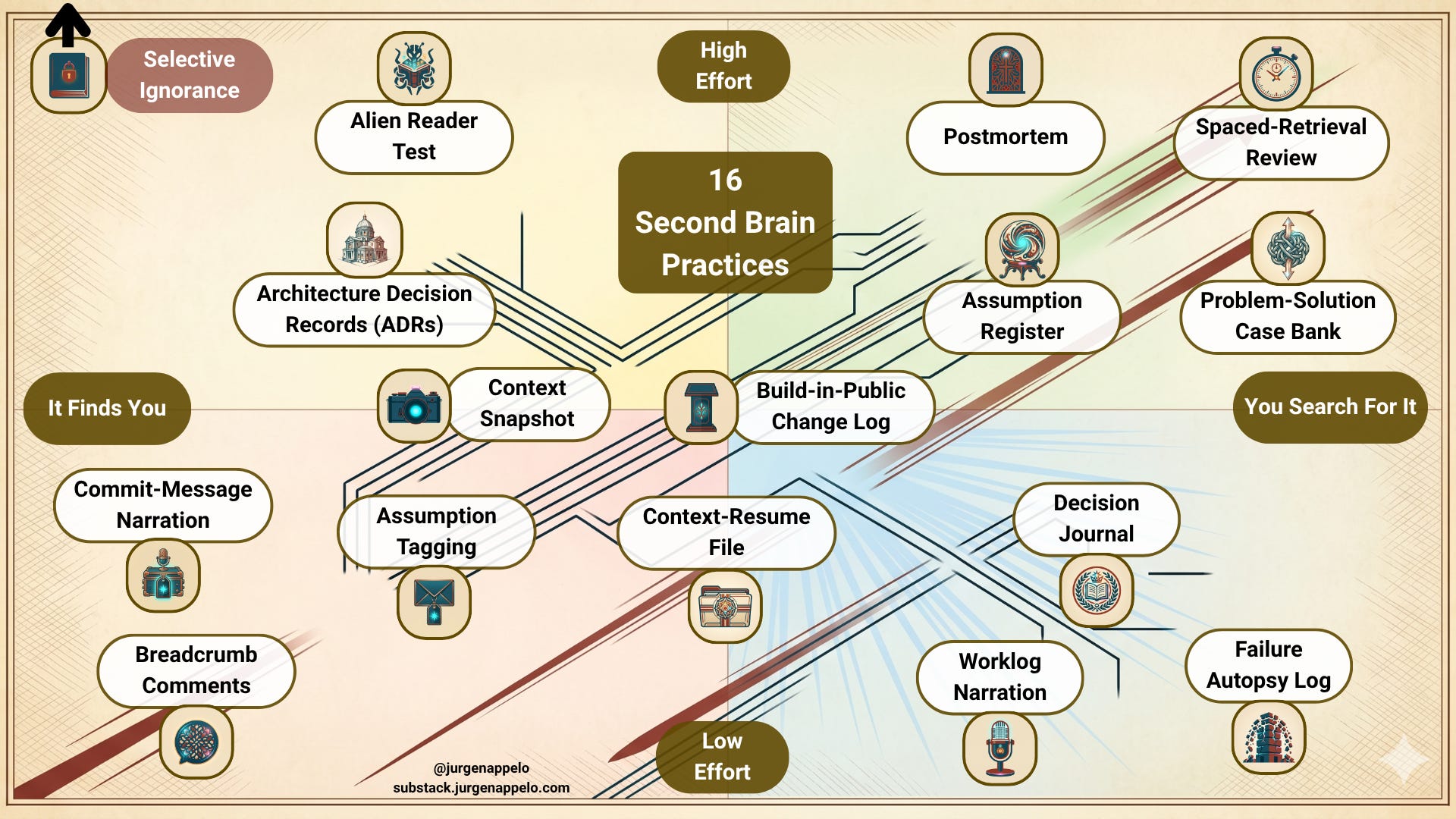
Vertical: Friction
How much effort does the practice ask of you? At the bottom are things you can do in five seconds while half-awake and still recovering from yesterday’s tequila party. At the top are rituals that demand time, intent, and the sort of discipline most of us only claim to have on a CV.
Horizontal: Retrieval
How do you get the information back later? On the left are practices where the explanation is waiting for you to be discovered inside the artifact itself, like fingerprints at a crime scene. On the right are practices where you go hunting through your records like an investigator browsing through police dossiers.
That gives you four zones.
The bottom-left (red-ish) is where most people should begin: low effort, the information is embedded in the work. You’re like the painter who writes the names of the rooms on his paint buckets because that’s where he looks first to remember which room he painted in which color.
The top-right (green-ish) is where people rarely go because it takes more effort and discipline. You’re like an interior designer keeping extensive dossiers on their clients, with mood boards, wallpaper designs, and official color codes. It’s more professional. It’s also more work. The choice is entirely yours.
Every practice below includes an approximate map position so you can see where each belongs.
I’m a founder, intrapreneur, and former CIO rethinking governance for the one-person business, navigating sole accountability in the age of intelligent machines—informed by plenty of scar tissue. All posts are free, always. Paying supporters keep it that way (and get a full-color PDF of my book Human Robot Agent plus other monthly extras as a thank-you)—for just one café latte per month.
The 16 Second Brain Practices
1. Breadcrumb Comments
Also called: In-line Annotations, Mental Model Annotations
Map position: Friction 1, Retrieval 1 (near-zero effort, it finds you)
You place little “why” notes directly inside whatever you’re building. Code comments. Sticky notes on a Miro board. Footnotes in a doc. Comment bubbles in a spreadsheet formula.
The point isn’t to explain what you did. The artifact already shows that. The point is to record why you did it this way and, even better, what you tried that failed.
Think of them as trail markers. Not a grand theory. Not a diary. Just a small sign saying, “I went left here because the right path was a swamp.”
What you get:
Almost zero retrieval effort. The explanation lives exactly where the confusion will happen. You open the spreadsheet, hover over the cursed cell, and there it is.
What it costs:
Clutter. Breadcrumbs scattered across twelve tools, with no single place to search them all. And if you’re the kind of person who removes comments for aesthetic purity, congratulations, you’ve turned memory loss into a design principle.
How AI can help:
AI can watch what you’re doing in real time and propose tiny “why” annotations exactly where you’ll forget your reasoning later: inside code, cells, blocks, or canvases. Modern AI note tools can summarize a change, infer your intent from surrounding context, and drop a draft breadcrumb for you to accept or tweak in a second instead of typing from scratch.
2. Commit-Message Narration
Also called: Rubber Duck Commit Messages, Version Notes
Map position: Friction 2, Retrieval 1 (low effort, it finds you)
Every time you save a meaningful change to an artifact, not just code, write one sentence about why.
Not “updated pricing page.” More like: “switched from per-seat to flat pricing because churn data showed small teams bailing at the 5-seat tier — see spreadsheet in /analysis.”
Software developers have known for ages that commit messages should explain reasoning, not just activity. Many still write messages like “fixed stuff” because apparently literacy is optional in version control. But the idea works far beyond Git. Notion changelog blocks, Fibery version notes, a CHANGES.md file in a project folder, whatever you already use.
What you get:
Your version history becomes a chronological trail of decisions. The “why” stays attached to the artifact, where it belongs.
What it costs:
It only helps with things that actually go through versioning. Decisions made in meetings, emails, or the damp cave of your own head still disappear. It also tends to fail on work you touch irregularly, because broken rhythm kills habits with surprising efficiency.
How AI can help:
AI assistants in editors and Git tools already generate commit messages from diffs, turning “fixed stuff” into clear, structured explanations by default. You can then add a single sentence of higher-level reasoning, which means the habit survives even on hectic days because 80% of the narration is auto-filled in a click.
3. Assumption Tagging
Also called: Decision Expiry Dates, Review-by Dates
Map position: Friction 2, Retrieval 2 (low effort, it finds you)
Whenever a decision depends on something you haven’t fully validated, tag it. A comment. A label. A metadata field. Something attached to the artifact itself.
Examples:
“I think customers prefer monthly billing.”
“This assumes the API v3 pricing stays stable.”
REVIEW_BY: 2026-09-01
This idea is borrowed from food labeling, which is funny and a bit humiliating. Your reasoning also has a shelf life.
What you get:
Protection against a sneaky kind of failure. You often remember what you decided. You almost never remember that the decision rested on an assumption that may now be false. Assumption tags make the conditional part visible.
What it costs:
Honesty. You have to admit uncertainty at the exact moment you most want to look decisive. That stings a little. Good. That’s the feature.
How AI can help:
AI can scan your notes, tickets, or docs for hedging language (“I think,” “assumes,” “probably”) and automatically suggest them as assumptions with review-by dates. It can then build a light dashboard of “expiring assumptions” and ping you when reality or external data changes, so the tags turn into an active safety net instead of passive guilt markers.
4. Context-Resume File
Also called: Status Dump, “Where I Was” Note, Session Note
Map position: Friction 2, Retrieval 3 (low effort, somewhat proximate)
Before you switch away from a project, spend five to ten minutes writing a handoff note to Future You. Where you stopped. What the current state is. What the next concrete move would be. What you were stuck on. Which mental model you were using.
Psychologists do a version of this after therapy sessions so they can re-enter the client’s world later. You’re doing the same thing, except the client is your project, and the therapist is also you. Make of that what you will.
What you get:
The half-hour fog of “Wait, where was I?” shrinks to two minutes. You sit down, read the note, and your brain boots much faster.
What it costs:
You have to write it before switching away, which is precisely when you feel too rushed to do it. Also, let’s not romanticize these notes. They’re brilliant for tomorrow. After a month, they’re archaeology. That’s fine. They’re a near-term memory aid, not a family heirloom.
How AI can help:
Instead of manually writing a context-resume note, you can ask an AI workspace to generate a “where I was” summary from your last edits, open tabs, and recent worklog entries when you switch tasks. When you come back, the same system can present a short recap and a suggested “next three moves,” so booting your mental state is mostly reading and choosing, not reconstructing.
5. Worklog Narration
Also called: Engineering Daybook, Daily Work Log, Stream-of-Consciousness Log
Map position: Friction 1, Retrieval 4 (very low effort, you search for it)
This is a time-stamped stream of what you’re doing and thinking as you work.
“10:15 — trying approach X for the API integration. The docs say Y, but that doesn’t match what I’m seeing. Going to try Z instead.”
Developers call this a daybook. For a solo operator, it’s basically thinking out loud to a colleague who stubbornly refuses to exist.
What you get:
You capture the messy middle, the dead ends, the tiny insights, the context that never makes it into polished output. When you forget why something happened, a chronological trail is often enough to reconstruct the logic.
What it costs:
Volume. Lots of text, much of it low signal. Finding one useful thread later can mean skimming several pages of “10:47 — still stuck on the same thing.” Glamorous, this is not.
How AI can help:
AI note-takers can transcribe your muttering, keystrokes, and window switches into a time-stamped stream automatically, then condense hours of messy logs into a concise outline of key decisions, dead ends, and breakthroughs. You keep the raw stream for archaeology, but day to day you mostly search and read the AI-generated highlights instead of wading through pages of “still stuck.”
6. Decision Journal
Also called: Decision Log, Project Decision Log
Map position: Friction 2, Retrieval 4 (low-ish effort, you search for it)
Keep a running log of non-trivial decisions. Date each entry. Record what you decided, what alternatives you considered, what you believed at the time, and what you expected to happen.
Notebook, Notion, video diary, plain text, crumpled parchment, it doesn’t matter much. The medium is not the hard part.
Shane Parrish pushed this practice as a way to fight hindsight bias, and he was right. The value sits in the gap between what you expected and what actually happened. That gap is where your learning hides, usually while wearing camouflage.
What you get:
Your invisible thinking becomes searchable text. You’re writing letters to your future self. Future You won’t thank you every day. But roughly once a month, Future You will look almost competent because of it.
What it costs:
You must write the entry right after deciding, which is when your brain is already eyeing the next problem or putting out another fire. Miss the ritual once, and it gets much easier to miss again. Like gym memberships and flossing.
How AI can help:
AI can provide a structured decision template on demand, extract the relevant pieces from chat, docs, and email, and auto-fill a first draft journal entry right after a decision happens. Over time, it can surface patterns across entries—like which options you underweight or which beliefs often age badly—giving you meta-feedback that would take you hours to spot manually.
7. Failure Autopsy Log
Also called: Constraint-Based Problem Log, “What Broke and Why” File
Map position: Friction 1, Retrieval 5 (very low effort, you search for it)
A dedicated file for failures only. Not wins. Not all decisions. Just the things that hurt.
Each entry gets three fields:
the decision you made
why it hurt
what you’d do instead
No schedule. No ceremony. You add to it when pain provides motivation, which it generally does.
What you get:
You stop repeating the same failed move three months later after conveniently forgetting the constraints that killed it the first time.
What it costs:
The file can read like an anthology of your incompetence. It isn’t, of course. It’s just a skewed sample. But on a bad day, your brain won’t care about statistical bias.
How AI can help:
When something breaks, AI can ingest the error messages, commits, tickets, and your short description, then propose the three core fields: what you did, why it hurt, and what to try next. Later, it can cluster similar failures, so you see “this is the fifth time scope creep plus a vague contract burned you,” turning a depressing anthology into a map of constraints to design around.
8. Context Snapshot
Also called: Pre-Decision Capture, Epistemic State Record
Map position: Friction 3, Retrieval 2 (moderate effort, it finds you)
Before a non-trivial decision, write one paragraph answering this question: “What is true right now that makes this feel like the right call?” Attach it to the artifact. Then never edit it.
Filmmakers take continuity photos before scenes so they can keep the world consistent later. This is the same idea for decisions. You’re not recording the conclusion. You’re recording the conditions.
What you get:
A contemporaneous record of your actual epistemic state. Not a later reconstruction polished by memory, ego, or caffeine. Three months later, you can see what you believed and why, and compare it with the world as it turned out.
What it costs:
You have to pause before acting. For solo operators, that often feels like sacrilege. Speed is our religion right up until speed creates rework.
How AI can help:
Before you act, you can ask AI to summarize “what’s true right now” from all current signals—metrics, emails, notes, and threads—and turn that into a single, frozen context paragraph. Months later, you can have the same AI compare that snapshot with how the world actually looks now and highlight deltas, so the learning gap is made explicit instead of relying on fuzzy memory.
9. Build-in-Public Change Log
Also called: Public Decision Log, “What’s New” Page, Progress Newsletter
Map position: Friction 3, Retrieval 3 (moderate effort, hybrid)
Keep a public log of progress and reasoning. A newsletter section. A social thread. A change log page. The audience can be real people or imaginary admirers. Either works.
Explaining your choices to someone else forces a degree of clarity that private notes often don’t. You can lie to your notebook. It’s harder to lie cleanly in public.
What you get:
External accountability. The record exists because you published it. You can abandon a private journal without witnesses. A public log has a bit more social gravity.
What it costs:
Sanitization. You’ll polish. You’ll omit the ugly bits, the foolish mistakes, the tired decisions, the weird constraints. Which is awkward because those ugly bits are often the most useful parts to remember later.
How AI can help:
AI can turn your private worklog, commits, and decision notes into a publishable “build in public” update with a coherent narrative, cleaned-up language, and links to supporting artifacts. You keep the raw, messy reasoning privately, while the AI handles sanitization and formatting, so you get the benefits of public accountability without spending an evening polishing every post.
10. Architecture Decision Records (ADRs)
Also called: Rationale Docs, Project-Specific Decision Docs
Map position: Friction 4, Retrieval 2 (high effort, it finds you)
An ADR is a short, structured note with context, decision, and consequences. You write one whenever you make a structural choice about something you’ve built. Tech stack. Content workflow. Pricing model. Automation design. Anything with a shape that matters.
Then you store the record right next to the thing it describes, in the project folder, repo, or design space.
Software teams have used ADRs for years. The nice surprise is that they work just as well outside software. I should have written one for every Make scenario I ever built. Then I wouldn’t have started this article by sabotaging myself.
What you get:
When you return to a system and ask, “Why is this like this?”, the answer is already there. No detective work. No overconfident simplification. No accidental demolition.
What it costs:
It feels bureaucratic when you work alone. Like you’re producing paperwork for a team that exists only in your imagination. Then it saves you an afternoon, and suddenly the bureaucracy seems much less offensive.
How AI can help:
Given a diff, workflow diagram, or scenario change, AI can draft an ADR with context, decision, alternatives, and consequences, based on your existing ADR style and past records. Instead of feeling like lonely bureaucracy, ADRs become a one-click byproduct of making structural changes, and you just correct any subtle misunderstandings in a minute.
11. Alien Reader Test
Also called: Stranger Test, Science-Communication Standard
Map position: Friction 5, Retrieval 2 (highest effort, it finds you)
When you document a decision, write as if the reader is intelligent but knows absolutely nothing about your work, your jargon, or your context. Then reread every sentence and mark anything that depends on prior knowledge. Rewrite until a stranger could reconstruct your reasoning from the text alone.
This comes from science communication, where writers are trained to assume ignorance rather than familiarity. A useful habit, especially if you enjoy discovering how many hidden assumptions you pack into “obvious” explanations.
What you get:
Documentation that still works after memory fades. Because your future self, after a few weeks of context switching, is basically a stranger with your email address.
What it costs:
Time. Writing for a stranger takes longer. It also feels absurd when the decision seems obvious. “Of course I’ll remember why I did this.” You won’t. You never do. I don’t. None of us do. Yet every time, the illusion returns like a villain in a mediocre franchise.
How AI can help:
You can write the fastest, laziest version of your explanation and then ask AI to rewrite it for an “intelligent stranger,” explicitly checking for hidden jargon and missing steps. Because large models are trained on broad, non-specialist language, they’re good at flagging assumed context and proposing plainer alternatives, so your future self actually passes as an alien reader.
12. Assumption Register
Also called: Global Assumption Document, Risk Assumption Log
Map position: Friction 4, Retrieval 4 (high effort, you search for it)
This is a single living document, not per project, where you list active assumptions across your work.
Four columns:
assumption
which decisions depend on it
confidence level (high/medium/low/unknown)
last verified
You update it when you make a major decision or when reality moves under your feet (which reality does, often for sport).
Systems engineers use these in safety-critical settings. That sounds absurdly serious for a one-person business. Fair enough. For many people, Assumption Tagging (3) is enough. But if your systems are interconnected, and most solo businesses are more interconnected than their owners admit, one changing assumption can quietly damage five different things at once.
What you get:
A cross-project view of what your decisions depend on. You can see in one place which assumptions are still standing and which are wobbling.
What it costs:
It’s a fragile central artifact. If it goes stale, it becomes misleading. Which means neglect doesn’t just reduce its value. It turns it into a trap.
How AI can help:
AI can auto-populate a cross-project assumption register by scanning your docs and tools for recurring “we assume…” patterns, linking each assumption to the decisions and artifacts that depend on it. It can then monitor those assumptions against live data or news—say, pricing changes, new regulations, or performance shifts—and mark entries “needs review,” keeping the register from silently going stale.
13. Postmortem
Also called: Project Autopsy, Exit Interview with Yourself, After-Action Review
Map position: Friction 5, Retrieval 4 (highest effort, you search for it)
When you finish a project or hit a meaningful milestone, conduct a structured debrief before you jump to the next thing.
Ask:
What surprised you?
What would you do differently?
What did you learn that applies beyond this project?
What do you want to remember in six months?
The military does after-action reviews. Surgeons do their own versions. Solo operators tend to say, “Yes, I should probably do that,” and then sprint into the next task because momentum is a very persuasive liar.
What you get:
Short-term project memory gets turned into longer-term wisdom. Or at least into something slightly better than vibes.
What it costs:
The timing is awful. You’ve just completed something. Your brain wants novelty, movement, dopamine, anything except reflection. So this practice is valuable in exact proportion to how annoying it feels.
How AI can help:
At the end of a project, AI can aggregate commits, tasks, chats, and worklogs into a draft postmortem with timelines, surprises, root causes, and reusable lessons. You then spend your precious, low-motivation attention on correcting and deepening the analysis instead of hunting for what even happened, which makes it more likely you’ll do postmortems at all.
14. Problem-Solution Case Bank
Also called: Solution Library, Personal Knowledge Base
Map position: Friction 4, Retrieval 5 (high effort, you search for it)
This is a personal knowledge base organized by problem type, not by project and not by date.
Examples:
Email deliverability dropped
Client ghosted after proposal
API rate limit hit
Each entry includes symptoms, diagnosis, solution, outcome, and warnings.
Doctors build personal case libraries. Lawyers collect precedents. Builders remember which materials betrayed them. You can do the same. This is one of the more useful second brain techniques because it mirrors how problems arrive in real life, by symptom, not by chronology.
But the devil is in the execution. If you name entries badly or chop everything into microscopic fragments, your knowledge base becomes a landfill with a prettier logo.
What you get:
When a problem returns, you search by symptom instead of trying to remember which quarter or which client or which project was involved. That’s much closer to how your mind actually needs the information.
What it costs:
This is curation, not quick capture. You have to translate project-specific experience into generalized entries that are reusable and searchable. That takes work. Which is why most people admire the idea and then quietly avoid doing it.
How AI can help:
AI can watch for recurring problem patterns across your work and propose new case-bank entries when it detects “this looks like that earlier deliverability/ghosting/API issue.” It can also turn detailed project notes into generalized, symptom-based cases and help you tag and cluster them, so your case bank stays searchable and coherent instead of devolving into a labeled junkyard.
15. Spaced-Retrieval Review
Also called: Judgment Archaeology, Periodic Decision Review, Cold Reconstruction
Map position: Friction 5, Retrieval 5 (highest effort, you search for it)
This is really two related practices.
First, schedule reviews of older decisions, weekly, monthly, quarterly, whatever cadence you can live with. The point is to fight the forgetting curve through spaced repetition.
Second, and this is the more interesting one, pick old work from months ago, read it cold without notes, try to reconstruct what you were thinking, and then compare your reconstruction with your documentation.
That second version is borrowed from archaeology. You inspect the artifact, form a hypothesis about intent, then test it against evidence. Which is much more fun than admitting you forgot what your own spreadsheet does.
What you get:
An active defense against forgetting. And the cold-reconstruction variant gives you feedback on the quality of your documentation. If the artifact can’t explain itself, you’ll find out quickly.
What it costs:
It feels gloriously unproductive. Old work on the table, new work piling up, your brain insisting “I already know this” right before it proves the opposite. Not many people enjoy catching themselves in the act of forgetting.
How AI can help:
AI study planners and knowledge tools already implement spaced repetition algorithms; you can point them at your decisions and documentation instead of exam flashcards. The system schedules reviews of old decisions, quizzes you on “what did you expect and why,” and then shows your original notes, turning spaced retrieval into an automated training loop for your judgment rather than a guilt-driven calendar block.
16. Selective Ignorance (not on the map)
Also called: Decision Recklessness, the “I Don’t Need to Know” Rule
Map position: Off the map (meta-policy)
This is the anti-documentation practice.
For a clearly defined class of low-stakes, reversible decisions, you create an explicit rule: no justification, no notes, no captured reasoning. The only thing you document is the policy itself, one paragraph defining what counts as low-stakes and reversible, for example, decisions that can be undone within 48 hours and affect only your own workflow.
What you get:
You remove the overhead of constantly asking, “Should I document this?” That tiny meta-decision consumes more mental bandwidth than people expect. Sorting decisions in advance into “record this” and “don’t bother” frees your attention for the ones that matter.
What it costs:
The line between reversible and irreversible is fuzzy. Systems connect in ways we don’t notice until one little tweak knocks over three other things. So yes, you will occasionally get burned. The wager is that the saved cognitive effort outweighs the occasional mistake.
How AI can help:
AI can help you enforce your selective-ignorance policy by classifying decisions as low- or high-stakes in real time and nudging you only when something crosses your own “please document” threshold. For trivial, reversible tweaks, it can still keep a lightweight, auto-generated audit trail in the background, so you get the mental freedom of not justifying everything without completely erasing the breadcrumb if a “tiny” change turns out non-trivial later.
Voice and Video as Second Brain Capture
Many of these practices assume writing. That’s fine. Writing is great. It also isn’t mandatory.
A 30-second voice memo or a quick Loom screencast can replace written capture for many of them, especially Context-Resume Files (4), Worklog Narration (5), and Decision Journals (6). You speak faster than you type, and you’ll often say things aloud that you’d never bother to write down.
The trade-off is retrieval. Audio and video are miserable to skim and annoying to search. AI transcription is helping, fast, but it still isn’t perfect. So if you’re someone who won’t write a journal entry but will gladly mutter into your phone while walking to the kitchen, use voice. An imperfect record beats no record. Repeatedly.
Where to Start With Second Brain Practices”
You will not do all sixteen. You shouldn’t. But if you’re doing none of this yet, start in the bottom-left:
Breadcrumb Comments (1)
Commit-Message Narration (2)
They cost almost nothing, and the explanation appears where you need it.
If you already do those and still keep losing context, move upward:
Assumption Tagging (3)
Architecture Decision Records (10)
Those two are good for systems with enough complexity to bite back later (which is to say, almost all systems that survive long enough).
If you want more searchable memory, move right:
Decision Journal (6)
Failure Autopsy Log (7)
And if you want the higher-friction, higher-payoff end of the map, head into the top-right:
Postmortems (13)
Problem-Solution Case Bank (14)
Spaced-Retrieval Review (15)
That’s where some of the deepest value lives. It’s also where your discipline goes to negotiate with your calendar.
No solo operator will do all sixteen. They don’t need to. A handful of good second brain practices beats a grand system that collapses after nine days.
And if this all feels like too much, remember Selective Ignorance (16). Decide which decisions don’t deserve any of this, then stop pretending every tiny choice needs a sacred archive.
Past You doesn’t need to become a perfect historian. Past You just needs to leave better clues.
Jurgen, Solo Chief
P.S. Paying subscribers get access to a PDF, SVG and PPTX version of the diagram. ⬇️